
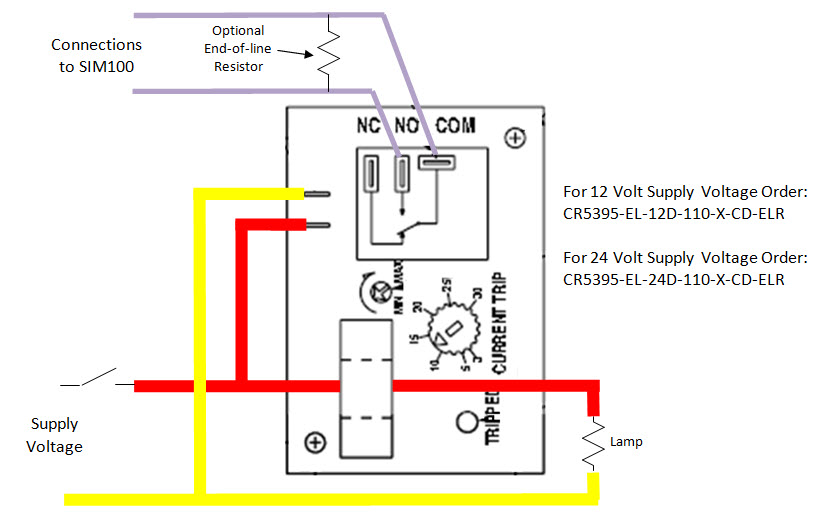
Yes, you can use the SIM100 together with a CR Magnetics current sensing relay to indicate that a bulb is burnt out. There are many different available configurations of the current sensing relay, but part numbers that have been tested with the SIM100 are the following:
Please see the following diagram, which shows how to connect the CR Magnetics current sensing relay to a SIM100. The light is connected to the supply voltage via a switch, which also powers the CR Magnetics current sensing relay (notice the wire to the light is run through the current sensor, which is the donut-shaped device on top of the CR Magnetics current sensing relay). If the bulb is burnt out and there is no current as sensed by the CR Magnetics current sensing relay, then the normally open contact is closed, which the SIM100 interprets as a burnt out bulb signal. The normally open contact will only close when the switch to the light is turned on and there is no current flowing to the light (i.e., a burnt out bulb). Please note the appropriate part number for the CR Magnetics current sensing relay depending on supply voltage, which is shown on the diagram.
Please see the attached data sheet for detailed information regarding the use of the CR Magnetics current sensing relays. IMPORTANT NOTE: In order to ensure proper operation, you must closely follow all of the manufacturer’s installation instructions and ensure that the CR Magnetics current sensing relay always operates within the manufacturer’s specifications.
IMPORTANT NOTE: In order to ensure proper operation, you must closely follow all of the manufacturer’s installation instructions and ensure that the CR Magnetics current sensing relay always operates within the manufacturer’s specifications.
Article ID: 446
Created: September 2, 2010
Last Updated: March 15, 2017
Author: Mark Oslund [[email protected]]
Online URL: https://www.maretron.com/wp-content/phpkbv95/article.php?id=446