1 General
1.1 Introduction
Congratulations
on your purchase of the Maretron SSC200 Solid State Rate/Gyro Compass. Maretron
has designed and built your compass to the highest standards for years of
reliable, dependable, and accurate service.
The
SSC200 detects the direction of the earth’s magnetic field using solid state
magnetometers and indicates the vessel heading relative to magnetic north. In addition,
the SSC200 incorporates solid state accelerometers and a solid state angular
rate sensor for indicating the vessel’s attitude (pitch and roll) and rate of
turn.
The
Maretron SSC200 is designed to operate within the harsh demands of the marine
environment. However, no piece of marine
electronic equipment can function properly unless installed, calibrated, and
maintained in the correct manner. Please
read carefully and follow these instructions for installation, calibration, and
usage of the Maretron SSC200 in order to ensure optimal performance.
1.2
Firmware Revision
This manual
corresponds to SSC200 firmware revision 2.0.
1.3 Features
The Maretron SSC200 Solid State Compass has the following
features.
·
NMEA 2000® and NMEA 0183 Interfaces
·
·
Solid State Accelerometers for Indicating the
Vessel’s Attitude (Pitch and Roll)
·
Solid State Angular Rate Sensor for Indicating
the Vessel’s Rate of Turn
·
Advanced Kalman Filtering for Stable and
Accurate Output During Dynamic Conditions
·
Fast Response Time Stabilizes Auto-Pilot Systems
·
Calibration for Compensating Magnetic Deviation
Caused by Hard and Soft Iron Effects
·
Installation-Offset Capability for Aligning the
Compass to the Vessel
·
Programmable Variation
·
Waterproof Enclosure and Cable System
1.4 Quick
Install
Installing the Maretron SSC200 compass involves the
following six steps. Please refer to the individual sections for additional
details.
1.
Unpack the Box (Section 2.1)
2.
Choose a Mounting Location (Section 2.2)
3.
Mount the SSC200 Compass (Section 2.3)
4.
Connect the SSC200 Compass (Section 2.4)
5.
Calibrate the SSC200 Compass for Magnetic
Deviation (Section 3.1)
6.
Calibrate the SSC200 Compass for
Installation-Offset (Section 3.3)
7.
Use Default Variation Source or Select an
Appropriate Variation Source (Section 4)
2
Installation
2.1 Unpacking
the Box
When unpacking the box containing the Maretron SSC200, you
should find the following items.
·
1 - SSC200
·
2 - Mounting Brackets
·
4 - Mounting Bracket Screws
·
4 - Mounting Screws
·
1 - 10 meter NMEA 0183 Cable*
·
1 - NMEA 2000® Micro Field Attachable
Connector (Female)*
·
1 - SSC200 User’s Manual
·
1 - Warranty Registration Card
* Only included in SSC200-01
If any of these items are missing or damaged, please contact
Maretron.
2.2 Choosing
a Mounting Location
The selection of a suitable
mounting location is important for the optimal performance of the Maretron
SSC200. The mounting location and orientation of the Maretron SSC200 should be:
1. Level
with the Earth’s Horizontal Plane – Although the SSC200 can be calibrated
in the vessel to compensate for pitch and roll installation-offset, it is best
to mount the compass as level as possible to maximize its pitch and roll
operational range.
2. Oriented
with Arrow Pointing to Bow Parallel to Vessel Centerline – Although
the SSC200 can be calibrated in the vessel to compensate for heading
installation-offset, it is best to mount the compass pointed towards the bow
and parallel to the vessel centerline. The SSC200 can be mounted in other
orientations, although this requires additional configuration steps; please
refer to Section 2.3
on page 3
for details.
3. Near
the Center of Gravity (CG) of the Vessel – The compass experiences the
least amount of movement when located at the CG, which allows the most accurate
readings. This is similar to a traditional card/needle compass, where the
farther the compass is from the CG, then the more the fluid sloshes around,
making accurate readings more difficult.
4. Away
from Structures Containing Ferrous Metals – The earth’s lines of magnetic
flux tend to become distorted in the vicinity of ferrous metals, which can
potentially cause errors in the compass’s indicated heading. The SSC200 can be
calibrated to compensate for these errors, but it is still best to minimize the
errors by placing the compass as far away from ferrous metals as is practical.
5. Away
from Magnetic Field Sources – Power or ignition cables, electric motors,
and other electronic equipment can create magnetic fields. The earth’s lines of
magnetic flux tend to become distorted in the vicinity of magnetic field
sources, which can potentially cause errors in the compass’s indicated heading.
The magnetic fields tend to come and go as power is switched on and off, which
makes compensation impractical. Therefore, you should try to mount the compass
as far away as possible from these magnetic field sources (doubling the
distance between the magnetic field source and the compass will reduce the
field strength by a factor of approximately 8). Also, always observe any
“compass-safe distance” markings on other electronic equipment.
6. Minimal
Vibration – Although the SSC200 is more tolerant of vibration than a
fluxgate compass, it is best to mount the compass in a location free of
vibration as opposed to a location with vibration.
2.3
Mounting the SSC200
The Maretron SSC200 compass can
be mounted to a horizontal surface such as a floor or deck (Section 2.3.1)
or it can be mounted to a vertical surface such as a wall or bulkhead (Section 2.3.2).
2.3.1 Mounting
the SSC200 to a Horizontal Surface
Mounting
the SSC200 compass to a horizontal surface requires that the provided mounting
brackets be fastened to the bottom of the SSC200 using the provided brass flat
head screws. Once the mounting brackets are securely fastened to the bottom of
the SSC200, attach the SSC200 securely to the vessel using the included brass
mounting screws or other non-ferrous fasteners as shown in Figure 1.
Do not use threadlocking compounds containing methacrylate ester, such as
Loctite Red (271), as they will cause stress cracking of the plastic enclosure.
The usual way of mounting the SSC200 to a horizontal surface
is to mount it to the top of the horizontal surface; however, the SSC200 may be
mounted upside down to the underside of a horizontal surface, provided that the
SSC200 is programmed to recognized that it is mounted upside down. This can be
done using a Maretron display product (e.g., DSM200 - please refer to the
DSM200 user’s manual for details).
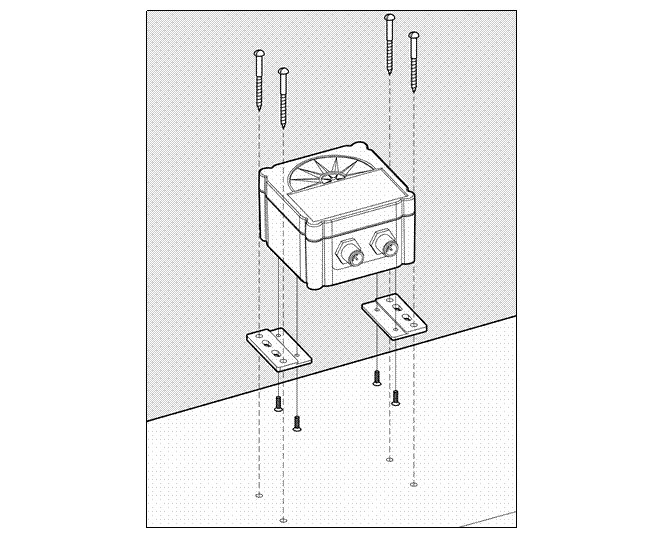
Figure
1 – Mounting the SSC200
to a Horizontal Surface
2.3.2 Mounting
the SSC200 to a Vertical Surface
Mounting
the SSC200 compass to a vertical surface requires that the provided mounting
brackets be fastened to the side of the SSC200 using the provided brass flat
head screws. Once the mounting brackets are securely fastened to the side of
the SSC200, attach the SSC200 securely to the vessel using the included brass
mounting screws or other non-ferrous fasteners as shown in Figure 2.
Do not use threadlocking compounds containing methacrylate ester, such as
Loctite Red (271), as they will cause stress cracking of the plastic enclosure.
The usual way of mounting the SSC200 to a vertical surface
is attaching the SSC200 to the forward side of a vertical surface, so that the
side of the compass with the connectors is facing the bow of the boat; however,
the SSC200 may be mounted to the astern side of a vertical surface, so that the
side of the compass with the connectors is facing the stern of the boat,
provided that the SSC200 is programmed to recognized that it is mounted in this
way (“backwards”). This can be done using a Maretron display product (e.g.,
DSM200 - please refer to the DSM200 user’s manual for details).
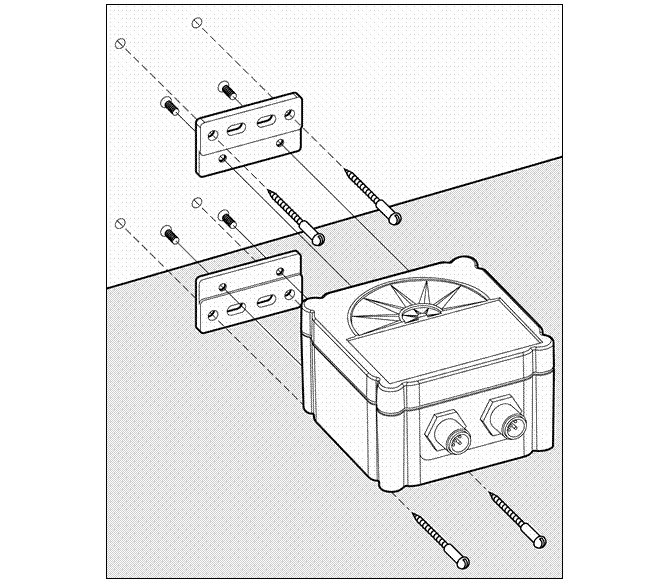
Figure 2 –
Mounting the SSC200 to Vertical Surface
2.4
Connecting the SSC200
You have a choice of connecting
the SSC200 to a NMEA 2000® interface (Section 2.4.1),
NMEA 0183 interface (Section 2.4.2),
or connecting both interfaces simultaneously (Section 2.4.2.2).
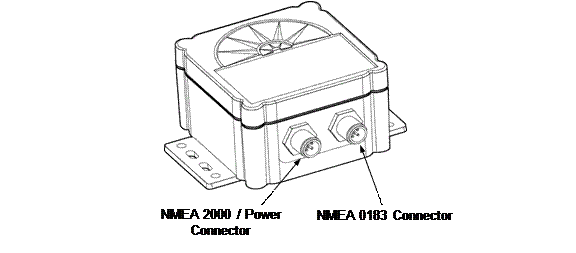
Figure 3 – NMEA 2000®
/ NMEA 0183 Interface Connector Locations
2.4.1 Connecting
to NMEA 2000® Interface
The Maretron SSC200 provides a
connection to an NMEA 2000® interface through a five pin male
connector (Figure
4).
You connect the SSC200 to an NMEA 2000® network using a Maretron
NMEA 2000® cable (or compatible cable) by connecting the female end
of the cable to the SSC200 (note the key on the male connector and keyway on
the female connector) as shown in Figure 5
below.. Be sure the cable is connected securely and that the collar on the
cable connector is tightened firmly. Connect the other end of the cable (male)
to the NMEA 2000® network in the same manner. The SSC200 is designed
such that you can plug or unplug it from an NMEA 2000® network while
the power to the network is connected or disconnected. Please follow
recommended practices for installing NMEA 2000® network products.
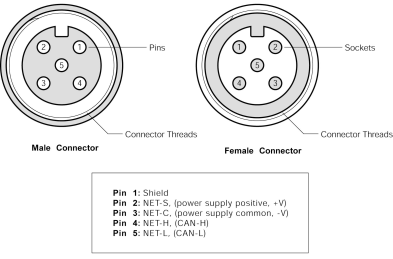
Figure
4 – NMEA 2000®/Power
Connector Face Views
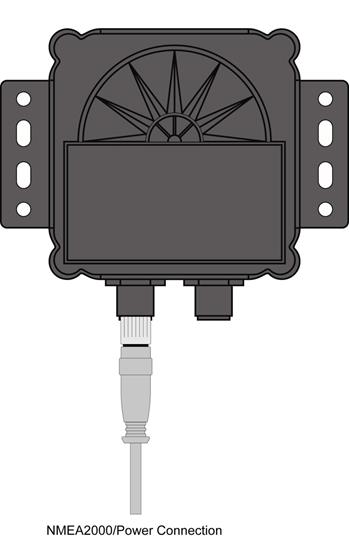
Figure 5 - SSC200 with NMEA 2000®
Connection Only
2.4.2 Connecting
to NMEA 0183 Interface
The Maretron SSC200 provides a
connection to an NMEA 0183 interface through an eight pin male connector (Figure 6).
You connect the SSC200 to an NMEA 0183 network using the Maretron supplied 10
meter cable by connecting the female end of the cable to the SSC200 (note the
key on the male connector and keyway on the female connector). Be sure the
cable is connected securely and that the collar on the cable connector is
tightened firmly.
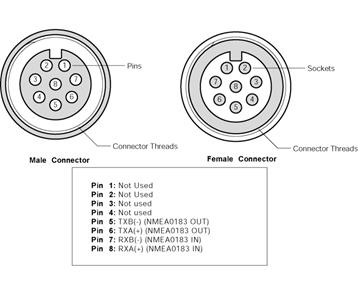
Figure 6 –
NMEA 0183 Connector Face Views
Connect the other end of the cable consisting of
individual wires using recommended practices for installing NMEA 0183 products.
Please note that NMEA 0183 does not have a standard for connectors and the
customer/installer should contact the manufacturer of the equipment to which
the SSC200 is being connected for information on how to properly connect the
device to the SSC200. The individual wires found within the cable have the
following color coding.
|
Wire Color |
Name |
Description |
|
Gray |
TXA |
Transmit Differential Output A Signal |
|
Brown |
TXB |
Transmit Differential Output B Signal |
|
Blue |
RXA |
Receive Differential Input A Signal |
|
White |
RXB |
Receive Differential Input B Signal |
Figure 7 –
NMEA 0183 Cable/Wire Color Coding
2.4.2.1
Power Connections
If the NMEA 2000® interface is connected, power is supplied to
the SSC200 through the NMEA 2000® network connection.
If only the NMEA 0183 interface is used, power connections
must be made via the NMEA 2000®/Power connector. Using the included
Micro Field Attachable Connector (Female), connect two power wires (not
included) to pins 2 and 3 of the field attachable connector (only the two power
pins need be connected) as shown in Figure 4 on page 6, assemble the connector per the
instructions packaged with the connector, and screw the connector snugly into
the NMEA 2000®/Power connector on the SSC200, as shown in Figure 8 below.
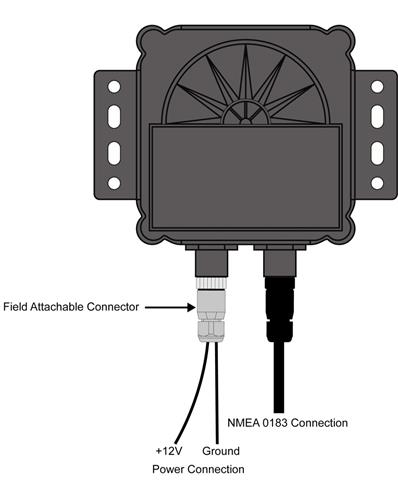
Figure 8 – SSC200 with NMEA 0183 Connection Only
2.4.2.2
Supported NMEA 0183 Baud Rates
The SSC200 compass supports NMEA0183
communication at both 4800 baud and 38400 baud.
All SSC200 Compasses are shipped with a baud rate of 4800 baud. The baud
rate may be set to 38400 baud by connecting to the compass using a terminal
emulator (See Appendix C for details) and sending the following strings to the
compass through the NMEA 0183 connection:
shell
This will cause the “cmd>” command prompt
to be displayed
tm
setbaud 38400
At this point, you must change the baud rate
of your connection to 38400 baud to continue, as the SSC200 has now been set to
the higher baud rate.
tm
storebaud
This causes the new baud rate to be stored to
non-volatile memory, so the compass will retain this baud rate when it is
powered down.
2.4.3 Connecting
Both NMEA 2000® and NMEA 0183 Interfaces
The SSC200 can be simultaneously connected to both an
NMEA 2000® network and an NMEA 0183 network.
2.4.4
Checking Connections
Once the NMEA 2000®/Power
and/or NMEA 0183 connections to the Maretron SSC200 have been completed, check
to see that heading information is being properly transmitted by observing an
appropriate display. Refer to Section 7,
“Troubleshooting”, if no heading information appears, otherwise proceed to
Section 3
entitled “Calibration”.
3
Calibration
In order to provide accurate
heading indication, the SSC200 must be calibrated in the vessel after
installation. The two calibration procedures that must be carried out are
magnetic deviation calibration (Section 3.1)
and installation-offset correction (Section 3.3).
These procedures should be carried out after the initial
compass installation and again at any time that the magnetic environment of the
vessel has changed significantly (for example, new cables have been routed near
the compass or new equipment made of ferrous metal has been installed near the
compass).
WARNING: It is imperative that calibration
procedures be carried out upon installation of the SSC200 to ensure accurate
readings.
3.1 Rate
of Turn Zero Offset Calibration
Since
the SSC200 uses the internal rate of turn gyros during the magnetic deviation
calibration process, the rate of turn gyros need to zeroed first. It is
possible to do “Rate of Turn Zeroing” using a Maretron display product, such as
the DSM150, DSM250, or N2KAnalyzer software (please refer to the display
product user’s manual for details).
3.2 Magnetic
Deviation Calibration
Magnetic and/or ferrous items
near a magnetic compass such as the SSC200 can cause errors in the compass’
heading output. These errors are referred to as magnetic deviation.
The Maretron SSC200 compass can compensate for heading
errors caused by magnetic deviation by learning about the magnetic environment
in which it has been mounted. This is done using one of four possible magnetic
deviation calibration procedures.
1.
Maretron Display Product Initiated (Section 3.2.1)
2.
Automatically at Power-Up (Section 3.2.2)
3.
Through the NMEA 0183 Interface (Appendix A)
4.
Through the NMEA 2000® Interface
(Appendix B)
All the procedures require that the vessel be turned in
successive circles during which time the SSC200 uses changing heading
information along with readings from the angular rate sensor to calculate hard
and soft iron magnetic deviation. Upon a successful completion of deviation
calibration, the SSC200 stores the deviation values in permanent memory for
subsequent compensation. Under certain conditions (e.g., turning to fast or to
slow), the SSC200 will not successfully complete the calibration process and
the SSC200 will not store the deviation values in its permanent memory.
Therefore, it is important to verify that the deviation calibration process
completed successfully.
The preferred method for deviation calibration is to use
a Maretron display (procedure 1) because you receive direct feedback on the
calibration process with a clear indication of a successful or unsuccessful
deviation calibration. Deviation calibration done automatically at power-up
(procedure 2) is less desirable than procedure 1 because it is more difficult
to verify that a successful deviation calibration completed. As an alternative
to procedures 1 and 2, users with direct access to the NMEA 0183 and NMEA 2000®
interfaces can perform magnetic deviation calibration directly through the NMEA
0183 interface (see Appendix A) or the NMEA 2000® interface (see
Appendix B). These direct access methods also provide an indication of a
successful deviation calibration or an indication of an unsuccessful deviation
calibration and the corresponding reason for the failure.
3.2.1 Maretron
Display Initiated Deviation Calibration
Maretron
display initiated deviation calibration is accomplished by turning the vessel
through successive circles while the SSC200 receives a command from a Maretron
display product (e.g., DSM200). The procedure is as follows:
1. Ensure
that the compass has been properly installed per Section 2.
2. Warm
up the compass by operating it for approximately 10 minutes.
3. Turn
the vessel (either direction) such that you complete a full 360° turn in 2½
minutes or less (try not to go below 1 minute for a complete circle).
4.
While continuing to turn the vessel as indicated
in step 3, use the display’s menu items to locate and send the deviation
calibration command (please refer to the display product user’s manual).
5.
Continue turning the vessel through at least
three complete circles until the display indicates a successful deviation
calibration.
While turning the
vessel, try to maintain a circle by holding the rudder at a constant angle. In
addition, try to minimize the vessel’s pitch and roll by calibrating on calm,
flat water.
After deviation
calibration is complete, the results of the deviation calibration, which
indicate the quality of the compass installation environment, may be seen using
a Maretron display product (e.g., DSM200 - please refer to the DSM200 user’s
manual for details). This allows you to compare different installation points
on a vessel to determine the optimum location for the SSC200.
3.2.2 Automatic
Power-Up Deviation Calibration
Automatic power-up deviation calibration is accomplished
by turning the vessel through four complete circles within 10 minutes of power-up.
The procedure is as follows:
- Ensure that the compass has been properly installed
per Section 2.
- Warm up the compass by operating it for approximately
10 minutes.
- Turn the vessel (either direction) such that you
complete a full 360° turn in 2½ minutes or less (try not to go below 1
minute for a complete circle).
- While continuing to turn the vessel as indicated in
step 3, remove the power from the compass and reapply power (this
initiates deviation calibration).
- Continue
turning the vessel through four complete circles in less than 10 minutes
from the time power was applied.
- Successful deviation is indicated when the SSC200
outputs the following sequence:
a) 0 Degrees for two seconds
followed by
b) 90 degrees for two seconds
followed by
c) 180 degrees for two seconds
followed by
d) 270 degrees for two seconds
followed by the actual heading
While turning the vessel, try to maintain a circle by
holding the rudder at a constant angle. In addition, try to minimize the
vessel’s pitch and roll by calibrating on calm, flat water.
3.3 Installation-Offset
Correction
After installation and successful deviation calibration,
it is important to perform installation-offset correction so that the displayed
compass heading, pitch, and roll match the actual vessel heading, pitch, and
roll. Installation-offset correction is done using one of four possible
procedures.
1. Maretron
Display Product Initiated (Section 3.3.1)
2. Manual
Installation-Offset Correction (Section 3.3.2)
3. Through
the NMEA 0183 Interface (Appendix A)
4. Through
the NMEA 2000® Interface (Appendix B)
The preferred method for
installation-offset is to use a Maretron display (procedure 1) which will automatically
calibrate the SSC200 without physically adjusting the compass as describe under
procedure 2 (Manual
Installation-Offset Correction).
As an alternative to procedures 1 and 2, users with direct access to the NMEA
0183 and NMEA 2000® interfaces can perform installation-offset
correction through the NMEA 0183 interface (see Appendix A) or the NMEA 2000®
interface (see Appendix B).
3.3.1 Maretron
Display Product Offset Correction
Installation-offset
correction can be performed using a Maretron display product (e.g., DSM200).
The procedure is as follows:
- Make sure the vessel is laying in flat
water on a known heading.
- Use the display’s menu items to locate
and send the compass installation-offset correction command (please refer
to display product user’s manual).
3.3.2 Manual
Installation-Offset Correction
Manual installation-offset correction is performed by
physically aligning the compass with the vessel. The procedure is as follows:
- With the vessel laying flat in the water, adjust the
roll angle of the SSC200 by adding small washers or spacers between the
mounting bracket holes and mounting surface until the display reads zero
for the roll angle (skip this step if you are not interested in viewing
the vessel’s roll angle).
- With the vessel laying flat in the water, adjust the
pitch angle of the SSC200 by adding small washers or spacers between the
mounting bracket holes and mounting surface until the display reads zero
for the pitch angle (skip this step if you are not interested in viewing
the vessel’s pitch angle).
- With the vessel laying flat in the water on a known
heading, adjust the heading of the SSC200 by rotating it until the display
reads the known vessel heading.
- Recheck that the roll and pitch readings are zero and
that the indicated heading is correct (repeat steps 1 through 3 as
necessary).
- Securely fasten the SSC200 by tightening the mounting
screws.
4 Variation
Variation
is the angular difference between the true meridian (great circle connecting
the geographic poles) and the magnetic meridian (direction of the lines of
magnetic flux). Variation has different values at different
locations on the earth with most areas undergoing change to the variation over
time.
Normally, heading information is displayed as
either a “true” heading (a direction relative to the geographic poles) or it is
displayed as a “magnetic” heading (a direction relative to the lines of magnetic
flux). North-seeking gyrocompasses are capable of measuring direction relative
to the geographic poles (“true”) whereas magnetic compasses measure direction
relative to the earth’s local magnetic flux (“magnetic”).
The SSC200 is a magnetic compass; therefore, it
requires an external source for variation if you want to view your heading in
“true” format. The SSC200 is capable of receiving variation in one of three
ways; 1) via the NMEA 0183 interface, 2) via the NMEA 2000®
interface, or 3) through manual variation entry.
Normally, the SSC200 will automatically use
variation from either the NMEA 0183 interface or the NMEA 2000®
interface, however, you can force the SSC200 to use variation from only the
NMEA 0183 interface or you can force the SSC200 to use variation from only the
NMEA 2000® interface or you can force SSC200 to only use manually
entered variation.
WARNING: Multiple variation sources
that are received by the SSC2000 (i.e., NMEA 0183 and NMEA 2000® interfaces) will
cause confusion as to the correct source to be used for true heading
indications. If more than one variation source is available, then the SSC200
needs to be programmed to use the appropriate source for reporting subsequent
true heading information. See Section 4.4 for details on
choosing a specific variation source when more than one variation source is
available.
4.1 Variation
Input via NMEA 0183 Interface
As shipped from the factory, the SSC200
automatically looks for variation data coming from the NMEA 0183 interface.
The SSC200 accepts variation data from the Recommended Minimum Specific GNSS
Data (RMC) sentence or the SSC200 computes variation from the Course Over
Ground and Ground Speed (VTG) sentence. If the SSC200 does indeed receive
variation information from the NMEA 0183 interface, then it will do the
following:
1. Transmit
the Heading, Deviation & Variation (HDG) sentence including the variation
field as seen from the RMC or VTG sentence over the NMEA 0183 interface if HDG
is enabled (see Appendix A for enabling or disabling NMEA 0183 sentences).
2. Transmit
the Heading True (HDT) sentence using variation data from the RMC or VTG
sentence over the NMEA 0183 interface if HDT is enabled (see Appendix A for
enabling or disabling NMEA 0183 sentences).
3. Transmit
over the NMEA 2000® interface the Magnetic Variation PGN
(127258) with the Variation Source field value corresponding to the received
NMEA 0183 variation data from the RMC or VTG sentence. The PGN’s Variation
Source field will be transmitted with the lowest possible quality indicator,
which is “Manual Entry”.
4.2
Variation Input via the NMEA 2000®
Interface
As shipped from the factory, the SSC200
automatically looks for variation data coming from the NMEA 2000®
interface. The SSC200 accepts variation data from the Magnetic Variation PGN
(127258). If the SSC200 does indeed receive variation information from the NMEA
2000® interface, then it will do the following:
1. Transmit
the Heading, Deviation & Variation (HDG) sentence including the variation
field as seen from the Magnetic Variation PGN (127258) from the NMEA 2000
interface if HDG is enabled (see Appendix A for enabling or disabling NMEA 0183
sentences).
2. Transmit
the Heading True (HDT) sentence using variation data from the Magnetic
Variation PGN (127258) from the NMEA 2000 interface if HDT is enabled (see
Appendix A for enabling or disabling NMEA 0183 sentences).
4.3
Variation Input via Manual Entry
If no other source of variation is available
(i.e., from either the NMEA 0183 or NMEA 2000®
interface), the SSC200 can be programmed with a fixed variation value for a
given location (this value can be found on most navigational charts). If
variation is manually entered into the SSC200, then it will do the following:
1. Transmit
the Heading, Deviation & Variation (HDG) sentence including the variation
field as manually entered over the NMEA 0183 interface if HDG is enabled (see
Appendix A for enabling or disabling NMEA 0183 sentences).
2. Transmit
the Heading True (HDT) sentence using variation data as manually entered over
the NMEA 0183 interface if HDT is enabled (see Appendix A for enabling or
disabling NMEA 0183 sentences).
3. Transmit
over the NMEA 2000® interface the Magnetic Variation PGN
(127258) with the Variation Source field value corresponding to the manually
entered variation. The PGN’s Variation Source field will be transmitted with
the lowest possible quality indicator, which is “Manual Entry”.
WARNING: Magnetic variation changes as
your position on the earth changes; therefore, the variation should be adjusted
with changes in position. The SSC200 will not automatically adjust variation
with changes in position; it is the responsibility of the user to adjust
variation with changes in position.
4.4 Variation
Source Selection
As shipped from the factory, the SSC200
automatically looks for variation from both the NMEA 0183 and NMEA 2000®
interfaces. If there is only a single source of variation available (either from
the NMEA 0183 or the NMEA 2000® interface), then there is no need to
manually select a variation source. However, if there are multiple variation
sources (i.e., variation available from both the NMEA 0183 and NMEA 2000®
interfaces) or there is no source for variation (i.e., variation is not
available from either the NMEA 0183 or the NMEA 2000®
interfaces), then it is necessary to select a particular variation source. The
SSC200 can be programmed to specifically use one of three possible variation
sources:
1. Variation
from Only NMEA 0183 Interface
2. Variation
from Only NMEA 2000® Interface
3. Variation
from Only Manual Entry
The SSC200 can be programmed to accept a
specific source for the variation data using one of two possible procedures.
1. Using
a Maretron Display (Section 4.4.1)
2. Through
the NMEA 0183 Interface (Section 4.4.2)
4.4.1 Variation
Source Selection via Maretron Display
You can program the SSC200 to use a
particular variation source using a Maretron display product (e.g., DSM200).
Refer to the display product user’s manual for details on programming the
SSC200 to use a specific variation source.
4.4.2 Variation
Source Selection via NMEA 0183 Interface
You can program the SSC200 to use a
particular variation source through the NMEA 0183 interface. Refer to Appendix
A for details on programming the SSC200 to use a specific variation source.
5 Rate
of Turn
The SSC200 is capable of measuring a vessel’s rate of
turn and outputting the information over both the NMEA 0183 and NMEA 2000®
interfaces. Furthermore, the SSC200 has a programmable damping period where the
filter time can be increased for very slow turning vessels such as tugs pushing
barges. Also, the SSC200 rate of turn indication may be zeroed to correct for
any temperature-induced offset.
The SSC200 can be programmed with different damping
periods and have the rate of turn indication zeroed using one of two possible
procedures.
1.
Using a Maretron Display (Section 5.1)
2.
Through the NMEA 0183 Interface (Section 5.2)
5.1 Rate
of Turn Damping Period Selection with Maretron Display
You can program the SSC200 to use
a particular rate of turn damping period using a Maretron display product (e.g.,
DSM200). Refer to the display product user’s manual for details on programming
the SSC200 to use a specific damping period.
5.2
Rate of Turn Damping Period Selection by NMEA
0183 Interface
You can program the SSC200 to use a particular rate of
turn damping period through the NMEA 0183 interface. Refer to Appendix A for
details on programming the SSC200 to use a specific damping period.
5.3
Rate of Turn Zeroing
The
SSC200 may be used as a rate of turn indicator, which should read zero when the
vessel is not turning. It is possible that the rate of turn indication has an
offset; that is, it may show a non-zero value when the vessel is at rest. This
offset changes with temperature but the SSC200 has the ability to remember the
offset at different temperatures. You teach the SSC200 by using “Rate of Turn
Zeroing”. It is possible to do “Rate of Turn Zeroing” using a Maretron display
product, such as the DSM200 (please refer to the display product user’s manual
for details).
6 Maintenance
Regular maintenance is important to ensure continued
proper operation of the Maretron SSC200. Perform the following tasks
periodically:
·
Clean the unit with a soft cloth. Do not use chemical cleaners as they may
remove markings or may corrode the compass enclosure or seals. Do not use any
cleaners containing acetone, as they will deteriorate the plastic enclosure.
- Ensure
that the unit is mounted securely and cannot be moved relative to the
mounting surface. If the unit is
loose, tighten the mounting screws and repeat the magnetic deviation
calibration and installation-offset correction.
- Check
the security of the cables connected to the NMEA 2000® and/or
NMEA 0183 interfaces and tighten if necessary.
7
Troubleshooting
If you notice unexpected operation of the Maretron
SSC200, follow the troubleshooting procedures in this section to remedy simple
problems.
Symptom |
Troubleshooting Procedure |
|
No heading output |
Check the connections to the NMEA 2000®/Power
connector and/or NMEA 0183 Connector and tighten if necessary Ensure that power is supplied to the connected NMEA 2000®
or NMEA 0183 cable For NMEA 0183
connections, ensure that the SSC200 is programmed to transmit the
appropriate type of sentence (HDT, HDG, or HDM) required by the connected
equipment. If the HDT sentence is being transmitted, ensure that the
SSC200 is provided with a source of magnetic variation information so that it
can calculate true heading from the magnetic heading. |
|
Inaccurate heading output |
Ensure the SSC200 is still mounted securely Ensure the SSC200 is still in a clean magnetic environment
and that no power or ignition cables or magnetic or ferrous objects have been
moved near the SSC200 Repeat the magnetic deviation compensation and
installation-offset correction procedures |
Figure 9 – Trouble Shooting
Guide
If these steps do not solve your problem, please contact
Maretron Technical Support (refer to Section 9
for contact information).
Warning: There are no user-serviceable
components inside the Maretron SSC200. Opening the SSC200 will expose the
sensitive electronic components to movement and adverse environmental
conditions that may render the compass inoperative. Please do not open the
SSC200, as this will automatically void the warranty. If service is required,
please return the unit to an authorized Maretron service location.
8 Technical
Specifications
Specifications
|
Parameter |
Value |
Comment |
|
Static Heading Accuracy |
<1° rms |
±45°
Pitch and Roll - 15°C to 35°C |
|
Heading Display Resolution |
0.1° |
With Maretron Display |
|
Settling Time |
1 Second |
To Static Accuracy after 35°/Second Turn |
|
Heading Deviation |
Yes |
Automatic or Initiated through Interfaces |
|
Alignment Calibration |
Yes |
Manual or Initiated through Interfaces |
|
Pitch and |
±80° |
|
|
Pitch and Roll Accuracy |
<1° |
±45° Pitch and Roll - 15°C to 35°C |
|
Pitch and Roll Display Resolution |
0.1° |
With Maretron Display |
|
Pitch and Roll to Boat Alignment |
Yes |
Manual or Initiated through Interfaces |
|
Rate of |
0° - 90° per Second |
|
|
Rate of Turn Accuracy |
±1° per Second |
0° Pitch and Roll - 15°C to 35°C |
Certifications
|
Parameter |
Comment |
|
NMEA 2000 |
Level A |
|
Maritime Navigation and Radiocommunication Equipment & Systems |
Tested to IEC 60945 |
|
FCC and CE Mark |
Electromagnetic Compatibility |
NMEA 2000® Parameter Group Numbers (PGNs) -
See Appendix B for Details
|
Description |
PGN # |
PGN Name |
Default Rate |
|
Periodic
Data PGNs |
127250 |
Vessel
Heading |
10 Times/Second |
|
127257 |
Attitude |
1 Time/Second |
|
|
127251 |
Rate
of Turn |
10 Times/Second |
|
|
Response
to Requested PGNs |
126464 |
PGN
List (Transmit and Receive) |
N/A |
|
126996 |
Product
Information |
N/A |
|
|
126998 |
Configuration
Information |
N/A |
|
|
Protocol
PGNs |
059392 |
ISO
Acknowledge |
N/A |
|
059904 |
ISO
Request |
N/A |
|
|
060416 |
ISO
Transport Protocol, Connection Management |
N/A |
|
|
060160 |
ISO
Transport Protocol, Data Transfer |
N/A |
|
|
060928 |
ISO
Address Claim |
N/A |
|
|
065240 |
ISO
Address Command |
N/A |
|
|
126206 |
NMEA |
N/A |
NMEA 0183 Sentences - See Appendix A for Details
|
Description |
Acronym |
Sentence Name |
Default Rate |
|
Transmitted Sentences |
HDG |
Heading, Deviation, and Variation |
10 Times/Second |
|
HDM |
Heading, Magnetic (Not normally transmitted, see Appendix A) |
N/A |
|
|
HDT |
Heading True (Not normally transmitted, see Appendix A) |
N/A |
|
|
ROT |
Rate of Turn |
5 Times/Second |
|
|
PMAROUT |
Maretron Proprietary Attitude (Pitch and Roll) |
1 Time/Second |
|
|
TXT |
Text Transmission |
N/A |
|
|
Received Sentences |
RMC |
Recommended Minimum Specific GNSS Data |
N/A |
|
VTG |
Course Over Ground and Ground Speed |
N/A |
Electrical
|
Parameter |
Value |
Comment |
|
Operating Voltage |
9 to 16 Volts |
DC Voltage |
|
Power Consumption |
<150mA |
Average Current Drain |
|
Load Equivalence Number (LEN) |
3 |
NMEA 2000® Spec. (1LEN = 50 mA) |
|
Reverse |
Yes |
Indefinetely |
|
Load Dump Protection |
Yes |
Energy Rated per SAE J1113 |
Mechanical
|
Parameter |
Value |
Comment |
|
Size |
4.46” x 3.23” x 2.14” |
Including Mounting Flanges |
|
Weight |
7 oz. |
|
|
Mounting |
Deck or Bulkhead |
|
Environmental
|
Parameter |
Value |
|
IEC 60954 Classification |
Exposed |
|
Degree of Protection |
IP67 |
|
Operating Temperature |
-25°C to 55°C |
|
Storage Temperature |
-40°C to 70°C |
|
Relative Humidity |
93%RH @40° per IEC60945-8.2 |
|
Vibration |
2-13.2Hz @ ±1mm, 13.2-100Hz @ 7m/s2 per IEC 60945-8.7 |
|
Rain and Spray |
12.5mm Nozzle @ 100liters/min from 3m for 30min per IEC 60945-8.8 |
|
Solar Radiation |
Ultraviolet B, A, Visible, and Infrared per IEC 60945-8.10 |
|
Corrosion (Salt Mist) |
4 times 7days @ 40°C, 95%RH after 2 hour Salt Spray Per IEC
60945-8.12 |
|
Electromagnet Emission |
Conducted and Radiated Emission per IEC 60945-9 |
|
Electromagnetic Immunity |
Conducted, Radiated, Supply, and ESD per IEC 60945-10 |
|
Safety Precautions |
Dangerous Voltage, Electromagnetic Radio Frequency per IEC 60945-12 |
9
Technical Support
If you require technical support for Maretron products,
you can reach us in one of the following ways:
Telephone: 1-866-550-9100
Fax: 1-602-861-1777
E-mail: [email protected]
World Wide
Web: http://www.maretron.com
Mail: Maretron, LLC
Attn:
Technical Support
9034
N. 23rd Ave Suite 13
10
Installation Template
Please
check the dimensions before using the following diagrams as templates for
drilling the mounting holes because the printing process may have distorted the
dimensions.
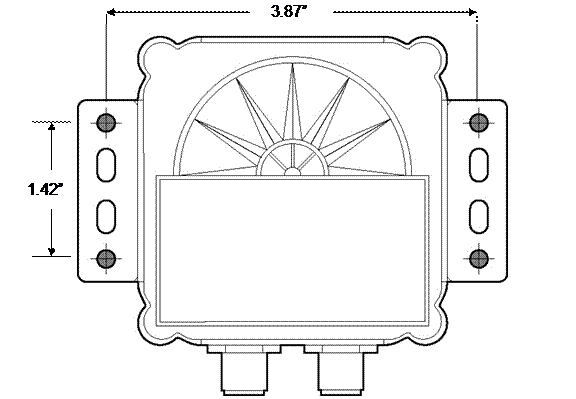
Figure 10 – Horizontal Mounting
Surface Template
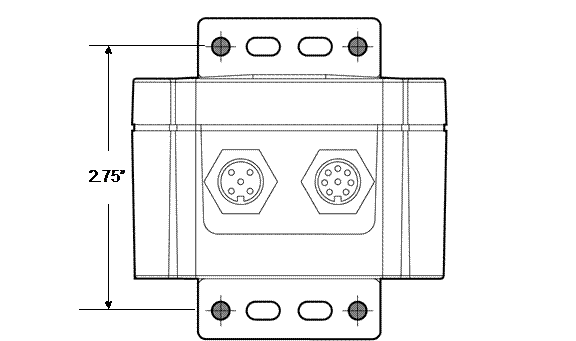
Figure 11 – Vertical Mounting
Surface Template
11
Maretron (2 Year) Limited Warranty
Maretron
warrants the SSC200 to be free from defects
in materials and workmanship for two
(2) years from the date of original purchase. If within the applicable
period any such products shall be proved to Maretron’s satisfaction to fail to meet the above limited
warranty, such products shall be repaired or replaced at Maretron’s option. Purchaser's exclusive
remedy and Maretron’s sole
obligation hereunder, provided product is returned pursuant to the return
requirements below, shall be limited to the repair or replacement, at Maretron’s option, of any product not
meeting the above limited warranty and which is returned to Maretron; or if Maretron is unable to deliver a
replacement that is free from defects in materials or workmanship, Purchaser’s
payment for such product will be refunded. Maretron assumes no liability whatsoever for expenses of removing
any defective product or part or for installing the repaired product or part or
a replacement therefore or for any loss or damage to equipment in connection
with which Maretron’s products
or parts shall be used. With respect to
products not manufactured by Maretron,
Maretron’s warranty obligation
shall in all respects conform to and be limited to the warranty actually
extended to Maretron by its
supplier. The foregoing warranties shall not apply with respect to products
subjected to negligence, misuse, misapplication, accident, damages by
circumstances beyond Maretron’s control,
to improper installation, operation, maintenance, or storage, or to other than
normal use or service.
THE FOREGOING WARRANTIES
ARE EXPRESSLY IN LIEU OF AND EXCLUDES ALL OTHER EXPRESS OR IMPLIED WARRANTIES,
INCLUDING BUT NOT LIMITED TO THE IMPLIED WARRANTIES OF MERCHANTABILITY AND OF
FITNESS FOR A PARTICULAR PURPOSE.
Statements made by any
person, including representatives of Maretron,
which are inconsistent or in conflict with the terms of this Limited Warranty,
shall not be binding upon Maretron
unless reduced to writing and approved by an officer of Maretron.
IN NO CASE WILL MARETRON BE LIABLE FOR
INCIDENTAL OR CONSEQUENTIAL DAMAGES, DAMAGES FOR LOSS OF USE, LOSS OF
ANTICIPATED PROFITS OR SAVINGS, OR ANY OTHER LOSS INCURRED BECAUSE OF
INTERRUPTION OF SERVICE. IN NO EVENT SHALL MARETRON’S AGGREGATE LIABILITY EXCEED THE PURCHASE PRICE OF THE
PRODUCT(S) INVOLVED. MARETRON SHALL NOT BE SUBJECT TO ANY
OTHER OBLIGATIONS OR LIABILITIES, WHETHER ARISING OUT OF BREACH OF CONTRACT OR
WARRANTY, TORT (INCLUDING NEGLIGENCE), OR OTHER THEORIES OF LAW WITH RESPECT TO
PRODUCTS SOLD OR SERVICES RENDERED BY MARETRON,
OR ANY UNDERTAKINGS, ACTS OR OMISSIONS RELATING THERETO.
Maretron does not
warrant that the functions contained in any software programs or products will
meet purchaser’s requirements or that the operation of the software programs or
products will be uninterrupted or error free. Purchaser assumes responsibility
for the selection of the software programs or products to achieve the intended
results, and for the installation, use and results obtained from said programs
or products. No specifications, samples,
descriptions, or illustrations provided Maretron
to Purchaser, whether directly, in trade literature, brochures or other
documentation shall be construed as warranties of any kind, and any failure to
conform with such specifications, samples, descriptions, or illustrations shall
not constitute any breach of Maretron’s
limited warranty.
Warranty Return Procedure:
To apply for warranty claims, contact Maretron or one of its dealers to
describe the problem and determine the appropriate course of action. If a
return is necessary, place the product in its original packaging together with
proof of purchase and send to
an Authorized Maretron Service Location. You are responsible for all shipping
and insurance charges. Maretron will return the replaced or repaired product
with all shipping and handling prepaid except for requests requiring expedited
shipping (i.e. overnight shipments).
Failure to follow this warranty return procedure could result in the product’s warranty becoming null and void.
Maretron reserves the right
to modify or replace, at its sole discretion, without prior notification, the
warranty listed above. To obtain a copy
of the then current warranty policy, please go to the following web page:
http://www.maretron.com/company/warranty.php