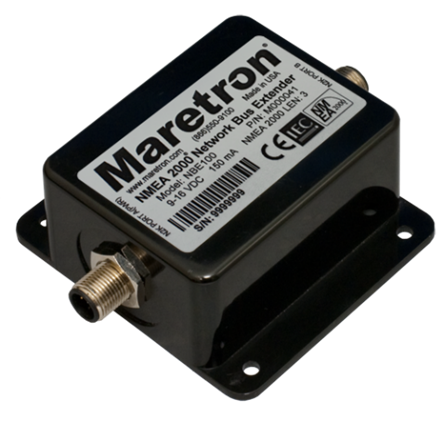
Congratulations on your purchase of the Maretron Network
Bus Extender. Maretron has designed and built your NBE100 to the highest
standards for years of dependable and accurate service.
Maretron's NBE100 (Network Bus Extender) allows you to
extend the maximum node count, network trunk length and cumulative drop length
of any NMEA 2000® network. The NBE100 solves bus errors and other
electrical issues caused by exceeding any of these limitations and makes design
of large networks easier. NMEA 2000® networks have a maximum of 50
nodes allowed on a single network, a maximum network trunk length of 200m and a
maximum cumulative drop length of 78m. If you have a network that exceeds any
of these specifications, you can simply disconnect the network trunk in the
middle and connect the ends to the NBE100, along with additional termination
resistors. This will split the network into two electrical segments, each of
which can have up to 50 nodes, for a total of 100 nodes on the logical network.
The NBE100 will transparently route NMEA 2000® messages between the
two network segments, making them work as a single logical NMEA 2000®
network. Advanced priority-based message routing ensures that higher-priority
messages are always prioritized over lower-priority messages, enabling
predictable and reliable network operation. For exceptionally large networks,
multiple NBE100’s may be used. Enable NBE100’s PGN Filtering Mode to pass only
the PGNs you desire.
This manual corresponds to NBE100 firmware revision 2.3.1.2
The Maretron NBE100 has the following features.
- Segments a single large NMEA 2000® network into
two smaller electrical segments.
- Allows you to exceed the 50 node limitation on a NMEA 2000®
network.
- Allows you to exceed the 200m trunk length limitation on a
NMEA 2000® network.
- Allows you to exceed the 78m cumulative drop length
limitation on a NMEA 2000® networks.
- Allows all NMEA 2000® devices to operate as if they were
still on a single NMEA 2000® network.
- Priority-based message routing ensures higher-priority
messages get through the bus extender first.
- Optically isolates network segments, increasing signal
integrity and network reliability.
- Features one user configurable PGN (Parameter Group
Number) “Pass filter” per NMEA200® Interface where 32 PGNs per interface
can be forwarded from one NMEA2000® Interface to the other.
The NBE100 can be applied, not only anytime a NMEA 2000® bus
needs extending, but also can be used to make only specific communication messaging
to be passed between NMEA2000® busses possible. Apply the PGN (Parameter Group
Number) Pass Filter and the NBE100 will allow only the desired PGN messages to
be passed between the connected NMEA2000® buses. Because NBE100 features a pass
filter for each of the two NMEA2000® Interfaces it has, Pass Filters will
obtain and forward the specific information messages you desire from one bus
onto the other or vice versa. This feature is great for reducing unnecessary
traffic but still share data without physically combining busses. The NBE100
allows up to 32 “Pass” PGNs per filter.
For an example of when NBE100 pass filtering is necessary,
suppose there is a vessel with two separate NMEA2000® buses. One Bus is for
used for “Navigation Devices” and the other bus is used for the vessel’s
Distributed Power System. The Distributed Power System has a Time display feature,
the Time feature is set manually however, has the ability to update it’s Time
via NMEA2000® message. Because the Distributed Power System’s NMEA2000® network
does not have any devices with updated Time messaging the Time display does not
update automatically when the vessel crosses time zones. Separately, the
Distributed Power System only sends alerts within its own NMEA2000® network and
would be beneficial if these messages could be shared to the “Navigation Devices”
NMEA2000® network giving the ability to acknowledge Distributed Power System
alerts using the vessel’s navigation display that is attached to the
“Navigation Devices” NMEA2000® network. An NBE100 is applied to this vessel to
connect the Distributed Power System’s NMEA2000® network and the “Navigation
Devices” NMEA2000® network. Using the NBE100 Pass Filter, the Distributed Power
System can get updated Time information from the “Navigation Devices” NMEA2000®
network and the “Navigation Devices” NMEA2000® network can receive Distributed
Power System alerts. The vessel’s captain can now acknowledge the Distributed
Power Systems alerts while underway using the vessel’s navigation display. The
NBE100 provides such a solution with only necessary bus traffic messaging being
passed.
Please note that the NBE100 will not filter and always pass ISO
Address Claim, Request, and Acknowledgement messages, as well as Product
Information allowing for “visibility” of all devices connected to the two
NMEA2000® networks as if they were one.
When unpacking the box containing the Maretron NBE100,
you should find the following items:
1 – NBE100 – Network Bus Extender
1 – Parts Bag containing 4
Stainless Steel Mounting Screws
1 – NBE100 User’s Manual
1 – Warranty Registration Card
If any of these items are missing or damaged, please
contact Maretron.
Please consider the following
when choosing a mounting location.
- The NBE100 is waterproof, so it
can be mounted in a damp or dry location.
- The orientation is not important,
so the NBE100 can be mounted on a horizontal deck, vertical bulkhead, or
upside down if desired.
- The NBE100 is temperature-rated
to 55°C (130°F), so it should be mounted away from engines or engine rooms
where the operating temperature exceeds the specified limit.
Attach the
NBE100 securely to the vessel using the included stainless steel mounting
screws or other fasteners as shown in Figure 1 below.
Do not use thread locking compounds containing methacrylate ester, such as
Loctite Red (271), as they will cause stress cracking of the plastic enclosure.

Figure
1 – Mounting the NBE100
The NBE100 requires one type of electrical connection: the
NMEA 2000® connections (refer to Section 2.4.1).
2.4.1
NMEA 2000® Connection
The NBE100 has two NMEA 2000®
connectors. The NMEA 2000® connectors can be found on either end of
the enclosure.
The NMEA 2000®
connectors are round five pin male connector (see Figure 2). You connect the NBE100
to an NMEA 2000® network using a Maretron NMEA 2000®
cable (or compatible cable) by connecting the female end of the cable to the NBE100
(note the key on the male connector and keyway on the female connector). Be
sure the cable is connected securely and that the collar on the cable connector
is tightened firmly. Connect the other end of the cable (male) to the NMEA 2000®
network in the same manner. The NBE100 is designed such that you can plug or
unplug it from an NMEA 2000® network while the power to the network
is connected or disconnected. Please follow recommended practices for
installing NMEA 2000® network products.

Figure 2
– NMEA 2000® Connector Face Views
The NBE100 is installed on an NMEA 2000® network
between the two sections that you wish to physically isolate. Because the port
on the NBE100 are optically isolated, there is no electrical connection through
the NBE100, so you must ensure that each of the two NMEA 2000®
networks connected to the NBE100 have separate power sources and two termination
resistors. This means that if you use an NBE100 to split an existing network
into two separate networks, you must provide one additional power connection
and two additional termination resistors (one for each side of the NBE100).
The two NMEA 2000® connectors are labeled “N2K
PORT A(PWR)” and “N2K PORT B”. Logically, these connectors are identical; that
is, you can connect the NBE100 between two networks in either way and it will
function identically. However, the NBE100 sources power only from the connector
marked “N2K PORT A(PWR)”. It uses no power from the connector labeled “N2K PORT
B”.
Figure 3 below shows the installation of an NBE100 into a
simple NMEA 2000® network.
For exceptionally large networks, multiple NBE100’s may be
used to segment the network into more than two segments. Each segment must have
its power connection and two termination resistors.

Figure 3 – NBE100 Connection Diagram
2.4.2 Checking Connections
Once the NMEA 2000® connections
to the NBE100 have been completed, check to see that information is being
properly transmitted by using an appropriate NMEA 2000® display to
observe a sensor on the opposite side of the NBE100. If you don’t see data from
that sensor, refer to Section 4, “Troubleshooting”.
The NBE100 will function on the
NMEA 2000 network as it is shipped from the factory; no user configuration is
required. The NBE100 features PGN filtering if enabled. Configure the NBE100
using Maretron’s N2KAnaylzer®. See details below for information on how to
configure your NBE100.
The “General Tab” for the NBE100 features a blank field for
entering a Label. Enter any Label desired in the field such as the NBE100’s
location on the vessel or an NBE100 reference number such as “Box 2”. See
example below of the “General Tab”.

Figure 4 - NBE100 General Tab
In the “Advanced Tab” there is a field for Device Instance. NMEA
2000® provides a unique device instance for each device on a vessel.
This value should be programmed in each NBE100 so that each NBE100 is
associated with a unique device instance number. The default instance number is
0, which is used to indicate the first NBE100 that is hooked to the network.
Subsequent NBE100’s connected to the network would be numbered 1, 2, and so on.
See preceding figure of the NBE100 Advanced Tab containing this field.

Figure 5 - NBE100 Advanced Tab
The NBE100 has a feature with which only certain messages
will be passed from one port to the other, as opposed to the default state, in
which all messages are passed between both ports. Messages to be passed are
selected on the basis of the Parameter Group Numbers (PGN’s) of the messages.
This is useful for passing only certain information from the NMEA 2000 network
on one port of the NBE100 to the NMEA 2000 network on the other port.
If the PGN Filter is enabled the
NBE100 will filter all PGNs except for the PGNs entered into the “Exception
Field”. Where “CAN1” refers to the NBE100’s “N2K Port A” and “CAN2” refers to
the NBE100’s “N2K Port B”, the PGN Filter can filter PGNs traveling from CAN1
to CAN2, CAN2 to CAN1 or PGNs traveling both directions. To enable PGN
Filtering, select “Enable” in the drop-down box located under the desired PGN
traveling direction to be filtered. To enable PGN filtering exceptions, enter
the PGN number into the “PGN” field located under the “Filter Enabled” dialog.
See example of the NBE100 PGN Filter Tab in the preceding figure for example of
this feature.

Figure 6 - NBE100 PGN Filter Tab
In the “Installation Description
Tab” you can store data to the NBE100 for information about the installation or
any notes required. See preceding figure of the NBE100 Installation Description
Tab to see it’s content.

Figure 7 - NBE100 Installation
Description Tab
Regular maintenance is important to ensure continued
proper operation of the Maretron NBE100. Perform the following tasks
periodically:
- Clean the unit with a soft
cloth. Do not use chemical cleaners as they may remove paint or markings
or may corrode the NBE100 enclosure or seals. Do not use any cleaners
containing acetone, as they will deteriorate the plastic enclosure.
- Ensure that the unit is mounted
securely and cannot be moved relative to the mounting surface. If the
unit is loose, tighten the mounting screws.
- Check the security of the cables
connected to the NMEA 2000® connector and tighten if necessary.
If you notice unexpected
operation of the Maretron NBE100, follow the troubleshooting procedures in this
section to remedy simple problems. If these steps do not solve your problem,
please contact Maretron Technical Support (refer to Section 6
for contact information).
|
Symptom
|
Troubleshooting
Procedure
|
|
No devices on one side of the NBE100 are visible from a
display connected to the other side.
|
- Ensure that the NBE100 is properly connected to the NMEA
2000® network segments.
- Ensure that both NMEA 2000 network segments have power.
- Ensure that both NMEA 2000 network segments have two
termination resistors fitted.
|
|
PGNs do not pass the NBE100
|
- Ensure desired configuration of the PGN Filter feature
|
As Maretron is constantly
improving its products, all specifications are subject to change without
notice. Maretron products are designed to be accurate and reliable; however,
they should be used only as aids to navigation and not as a replacement for
traditional navigation aids and techniques.
Certifications
|
Parameter
|
Comment
|
|
NMEA 2000® Standard
|
Level A+
|
|
Maritime Navigation and Radiocommunication Equipment & Systems
|
IEC 61162-3
|
|
Maritime Navigation and Radiocommunication Equipment & Systems
|
IEC 60945
|
|
FCC and CE Mark
|
Electromagnetic Compatibility
|
NMEA 2000®
Parameter Group Numbers (PGNs)
|
Description
|
PGN #
|
PGN Name
|
Default Rate
|
|
Response to Requested PGNs
|
126464
|
PGN List (Transmit and Receive)
|
N/A
|
|
126996
|
Product Information
|
N/A
|
|
126998
|
Configuration Information
|
N/A
|
|
Protocol PGNs
|
059392
|
ISO Acknowledge
|
N/A
|
|
059904
|
ISO Request
|
N/A
|
|
060928
|
ISO Address Claim
|
N/A
|
|
065240
|
ISO Address Command
|
N/A
|
|
126208
|
NMEA Request/Command/Acknowledge
|
N/A
|
|
Maretron Proprietary PGN’s
|
126720
|
Configuration
|
N/A
|
Electrical
|
Parameter
|
Value
|
Comment
|
|
Operating Voltage
|
9 to 16 Volts
|
DC Voltage
|
|
Power Consumption
|
<150mA
|
Average Current Drain
|
|
Load Equivalence Number (LEN)
|
|
NMEA 2000® Spec. (1LEN = 50 mA)
|
|
Reverse Battery Protection
|
Yes
|
Indefinitely
|
|
Load Dump Protection
|
Yes
|
Energy Rated per SAE J1113
|
Mechanical
|
Parameter
|
Value
|
Comment
|
|
Size
|
3.11” x 3.46” x 1.38”
(79mm x 88mm x 35mm)
|
Including Flanges for Mounting
|
|
Weight
|
8 oz. (227 g)
|
|
Environmental
|
Parameter
|
Value
|
|
IEC 60945 Classification
|
Exposed
|
|
Degree of Protection
|
IP67
|
|
Operating Temperature
|
-25°C to 55°C
|
|
Storage Temperature
|
-40°C to 70°C
|
|
Relative Humidity
|
93%RH @40°C per IEC60945-8.2
|
|
Vibration
|
2-13.2Hz @ ±1mm, 13.2-100Hz @ 7m/s2
per IEC 60945-8.7
|
|
Rain and Spray
|
12.5mm Nozzle @ 100liters/min from 3m
for 30min per IEC 60945-8.8
|
|
Solar Radiation
|
Ultraviolet B, A, Visible, and Infrared
per IEC 60945-8.10
|
|
Corrosion (Salt Mist)
|
4 times 7 days @ 40°C, 95%RH after 2
hour Salt Spray Per IEC 60945-8.12
|
|
Electromagnetic Emission
|
Conducted and Radiated Emission per IEC
60945-9
|
|
Electromagnetic Immunity
|
Conducted, Radiated, Supply, and ESD
per IEC 60945-10
|
|
Safety Precautions
|
Dangerous Voltage, Electromagnetic
Radio Frequency per IEC 60945-12
|
If you require technical
support for Maretron products, you can reach us in any of the following ways:
Telephone: 1-866-550-9100
Fax: 1-602-861-1777
E-mail: [email protected]
World Wide Web: http://www.maretron.com
Mail: Carling Technologies, Inc.
Attn: Maretron
Technical Support
120 Intracoastal
Pointe Dr. Suite 100
Jupiter, FL 33477
USA
Please check the dimensions before using the following
diagram as a template for drilling the mounting holes because the printing
process may have distorted the dimensions.

Figure 8 – Mounting Surface Template
Carling
Technologies warrants the Maretron® NBE100 to be free from defects
in materials and workmanship for two (2) years from the date of
original purchase. If within the applicable period any such products shall be
proved to Carling’s satisfaction to fail to meet the above limited warranty,
such products shall be repaired or replaced at Carling’s option. Purchaser's
exclusive remedy and Carling’s sole obligation hereunder, provided product is
returned pursuant to the return requirements below, shall be limited to the
repair or replacement, at Carling’s option, of any product not meeting the
above limited warranty and which is returned to Carling; or if Carling is
unable to deliver a replacement that is free from defects in materials or
workmanship, Purchaser’s payment for such product will be refunded. Carling
assumes no liability whatsoever for expenses of removing any defective product
or part or for installing the repaired product or part or a replacement
therefore or for any loss or damage to equipment in connection with which
Maretron® products or parts shall be used. With respect to products
not manufactured by Carling, Carling’s warranty obligation shall in all
respects conform to and be limited to the warranty actually extended to Carling
by its supplier. The foregoing warranties shall not apply with respect to
products subjected to negligence, misuse, misapplication, accident, damages by
circumstances beyond Carling’s control, to improper installation,
operation, maintenance, or storage, or to other than normal use or service.
THE
FOREGOING WARRANTIES ARE EXPRESSLY IN LIEU OF AND EXCLUDES ALL OTHER EXPRESS OR
IMPLIED WARRANTIES, INCLUDING BUT NOT LIMITED TO THE IMPLIED WARRANTIES OF
MERCHANTABILITY AND OF FITNESS FOR A PARTICULAR PURPOSE.
Statements
made by any person, including representatives of Carling, which are
inconsistent or in conflict with the terms of this Limited Warranty, shall not
be binding upon Carling unless reduced to writing and approved by an officer of
Carling.
IN
NO CASE WILL CARLING BE LIABLE FOR INCIDENTAL OR CONSEQUENTIAL DAMAGES,
DAMAGES FOR LOSS OF USE, LOSS OF ANTICIPATED PROFITS OR SAVINGS, OR ANY OTHER
LOSS INCURRED BECAUSE OF INTERRUPTION OF SERVICE. IN NO EVENT SHALL CARLING’S
AGGREGATE LIABILITY EXCEED THE PURCHASE PRICE OF THE PRODUCT(S) INVOLVED. CARLING
SHALL NOT BE SUBJECT TO ANY OTHER OBLIGATIONS OR LIABILITIES, WHETHER ARISING
OUT OF BREACH OF CONTRACT OR WARRANTY, TORT (INCLUDING NEGLIGENCE), OR OTHER
THEORIES OF LAW WITH RESPECT TO PRODUCTS SOLD OR SERVICES RENDERED BY CARLING,
OR ANY UNDERTAKINGS, ACTS OR OMISSIONS RELATING THERETO.
Carling
does not warrant that the functions contained in any software programs or
products will meet purchaser’s requirements or that the operation of the
software programs or products will be uninterrupted or error free. Purchaser
assumes responsibility for the selection of the software programs or products
to achieve the intended results, and for the installation, use and results
obtained from said programs or products. No
specifications, samples, descriptions, or illustrations provided Carling to
Purchaser, whether directly, in trade literature, brochures or other
documentation shall be construed as warranties of any kind, and any failure to
conform with such specifications, samples, descriptions, or illustrations shall
not constitute any breach of Carling’s limited warranty.
Warranty Return
Procedure:
To
apply for warranty claims, contact Carling Technologies or one of its Maretron
dealers to describe the problem and determine the appropriate course of action.
If a return is necessary, place the product in its original packaging together
with proof of purchase and complete a Return Merchandise Authorization (RMA) on
the following web page:
https://www.maretron.com/rma_request.php
You will be
contacted by email with instructions on where to send the unit for repair /
evaluation. You are responsible for all shipping and insurance charges. Carling
will return the replaced or repaired product with all shipping and handling
prepaid except for requests requiring expedited shipping (i.e. overnight
shipments). Failure to follow this warranty return procedure could result in
the product’s warranty becoming null and void.
Carling
reserves the right to modify or replace, at its sole discretion, without prior
notification, the warranty listed above. To obtain a copy of the then current
warranty policy for Maretron®
products, please go to the following web page:
http://www.maretron.com/company/warranty.php